Claude Code Integration
Connect Claude Code to LLM Gateway with environment variables and verify a real file edit and test run.
Claude Code can use LLM Gateway's Anthropic-compatible endpoint while the gateway routes requests to your selected model. This walkthrough was verified with Claude Code 2.1.263.
Video walkthrough
Install
Install Claude Code using the official instructions, then check claude --version.
Configure the connection
Create a key in your dashboard, then set these variables in the terminal where you launch Claude Code:
1export ANTHROPIC_BASE_URL=https://api.llmgateway.io2export ANTHROPIC_AUTH_TOKEN="your_api_key"3export ANTHROPIC_MODEL=deepseek-v4-flash4claude1export ANTHROPIC_BASE_URL=https://api.llmgateway.io2export ANTHROPIC_AUTH_TOKEN="your_api_key"3export ANTHROPIC_MODEL=deepseek-v4-flash4claudeUse the base URL exactly as shown. Claude Code adds /v1/messages itself. If an existing ANTHROPIC_API_KEY causes an authentication conflict, unset it in this shell before starting.
The example model supports the tool calls needed to read, edit, and test code. Find other compatible choices in the live model catalogue.
Choose a model
Set ANTHROPIC_MODEL before launch, or override it for one session:
1claude --model deepseek-v4-flash1claude --model deepseek-v4-flashClaude Code's picker and model-discovery behavior vary by version. An explicit --model value is useful when your model is absent from the picker.
To add a custom picker option, current Claude Code also supports:
1export ANTHROPIC_CUSTOM_MODEL_OPTION=deepseek-v4-flash2export ANTHROPIC_CUSTOM_MODEL_OPTION_NAME="DeepSeek V4 Flash"1export ANTHROPIC_CUSTOM_MODEL_OPTION=deepseek-v4-flash2export ANTHROPIC_CUSTOM_MODEL_OPTION_NAME="DeepSeek V4 Flash"To discover the gateway models supported by Claude Code's picker, set CLAUDE_CODE_ENABLE_GATEWAY_MODEL_DISCOVERY=1 before launch. Discovery is subject to the client's model filtering; it does not guarantee that every gateway model appears.
Verify the connection
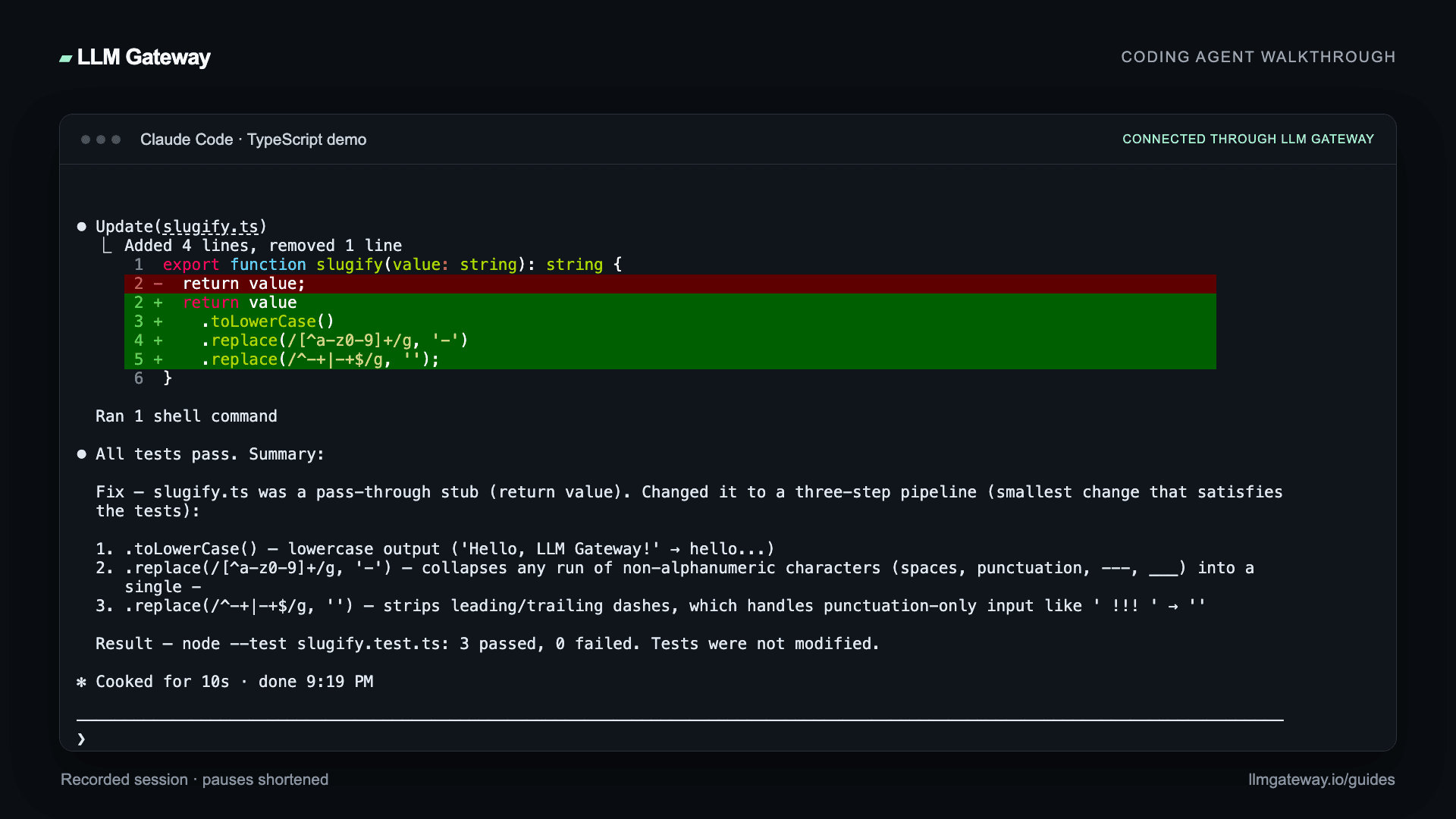
Open a small project and ask the agent to read a file, make a change, and run its tests. Our recorded example fixes a TypeScript slugifier and passes all three tests with deepseek-v4-flash through LLM Gateway.
Hello, LLM Gateway! becomes hello-llm-gateway; repeated separators collapse into one hyphen; empty and punctuation-only inputs stay empty. The demo uses Node.js 24 to run node --test slugify.test.ts directly.
Review the diff and test output, then check the request in your LLM Gateway dashboard. Choose other compatible models from the live catalogue.
Troubleshooting
- Requests use the wrong endpoint: check
ANTHROPIC_BASE_URLin the shell that starts Claude Code and restart the agent after changing it. - Authentication fails: verify the gateway key and resolve conflicting Anthropic authentication variables.
- A model is missing from the picker: launch with an explicit
--modelID from the catalogue. - An optional tool is unsupported: use a model with the required capability, or disable the tool for that session.
A DevPass plan key can also be used. Use canonical model IDs for plan routing.